 Repair Atlas
Coming soon for iPad and iPhone
Draw the defect. Draw the repair. Watch it close.
Repair Atlas is a 3D head for teaching Mohs reconstruction and for showing a patient the repair you chose.
How it works
-
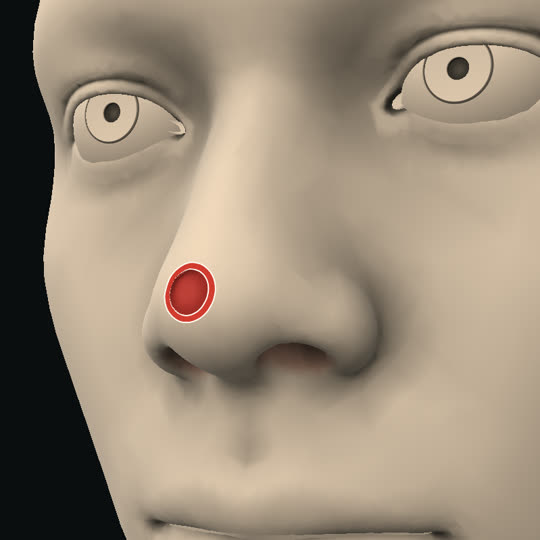
Draw the defect
Red ink, with Apple Pencil or a finger. Rough is fine: the app reads it as the nearest sensible shape.
-
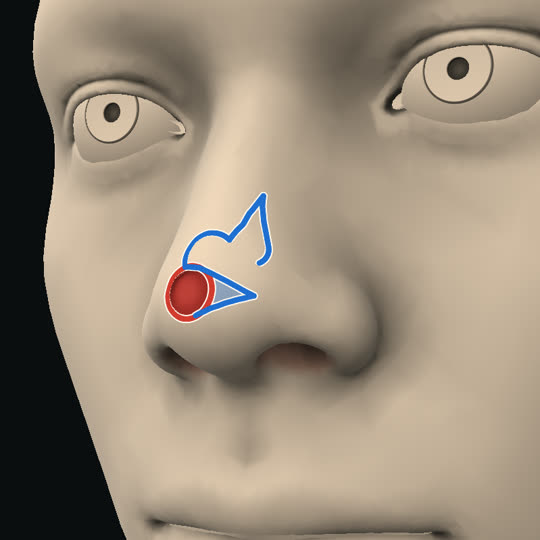
Draw the repair
Blue ink for the cuts. Then tap how it moves: advance, rotate or transpose.
-
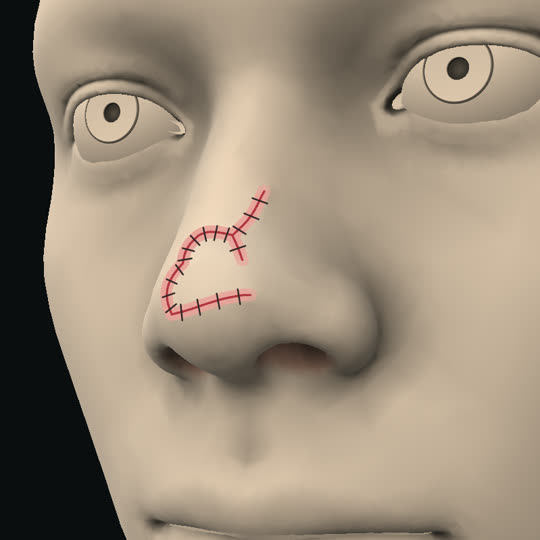
Watch it close
The skin moves as it does in surgery. The scar shows where it lies, then heals.
Closes what you draw
Each repair below was drawn on the head and closed by the app. You choose the repair. The app never suggests one.
Side to side
Rhombic
Rotation
A-to-T
V-Y island
Dorsal nasal
U advancement
Hatchet
Also bilobed, banner, note, Webster and melolabial transpositions, H and one-sided advancements, O-to-Z, interpolation flaps, purse string and second intention.
For teaching
A resident draws a design and sees how the skin moves: which way it travels, where the dog-ear sits and where the scar falls. Try another design in seconds.
For patients
Show a patient the repair you chose on a generic head before the day of surgery: where the cuts go, how the skin moves and where the scar will lie. It is a picture of the plan, not a promise of the result.
Private by design
- Works offline
- No account
- No analytics or ads
- Drawings stay on your device
- No photographs or patient data
Questions
Does it recommend a repair?
No. It shows the repair you draw and pick. It never suggests, ranks or scores a flap.
Is it my patient's anatomy?
No. Every case is on one generic head. The result is an illustration of how the repair moves, not a measurement or a prediction of an outcome.
What can I draw?
Side-to-side closures, advancement, rotation, transposition and interpolation flaps, purse string and second intention, anywhere on the head and face.
Which devices does it run on?
iPad and iPhone. Draw with Apple Pencil or a finger.
Does it need the internet?
No. Repair Atlas makes no network connections. Your drawings are saved on your device.
This app is intended for educational purposes only and does not guarantee clinical outcomes.